Mira
MiraHow to Run a Telegram Channel with AI: Task by Task
Author: Mira TeamPublished: Updated:
- ai
- telegram-channel
- content
TL;DR
- Give AI the work it does well: finding material, sorting it by topic, first drafts and cutting text.
- Keep four things for yourself: facts, your voice, what fits your readers and the final send.
- AI errors cluster in numbers, dates, names, quotes and links. Check each one against the source before you post.
- Mira reads your sources, scores each item against your channel and drafts the best ones. You approve every post.
AI can do much of the routine work of a Telegram channel in 2026. It finds and sorts material, writes first drafts and shortens text well. It checks facts badly and loses your voice without examples. So a person should approve every post. Below, we go task by task.
We make Mira (usemira.pro), a Telegram bot that finds and drafts channel posts. So we are not neutral. We checked the facts on 2026-10-11. If you find an error, write to us via the contact page.
What does AI do well in a Telegram channel, and what does it do badly?
AI is good at reading a lot of text fast and writing a first version. It is bad at knowing what is true and what your readers care about.
| Task | What AI does well | Where AI gets it wrong | What you decide |
|---|---|---|---|
| Find material | Reads many sources, spots new items | Invents news when asked for "trending topics" with no source | Which sources to trust |
| Pick what fits | Sorts items by your topic, skips repeats | Misses context, local news and irony | The topic, the readers, what to avoid |
| Write a draft | Turns a long article into a short post | Adds numbers, dates or quotes that are not in the source | Whether the post says something true and useful |
| Edit and cut | Shortens, removes filler, suggests a first line | Smooths your style into generic text | Your voice, your opinion |
| Format for Telegram | Adds bold, lists and links | Returns Markdown that breaks when you paste it | How the post looks in Telegram |
| Plan and publish | Spreads posts across a time window | Posts weak items if the rules are loose | When to post and what never posts without you |
| Read the results | Sorts posts by views or shares | Guesses reasons from small numbers | What to change next week |
Our advice: hand AI the reading, sorting and first drafts. Keep the facts, the voice and the send button.
Where do you find what to post?
Take material from real sources, and let AI pick what is new.
Generation from scratch means you ask a chat assistant for post ideas. Ask it for "this week's news" without a source, and it may describe events that did not happen.
Curation means a tool reads sources you chose and selects items for your channel. The facts come from a real page you can open, so this is the safer start.
Good sources are websites and RSS feeds, YouTube, subreddits, Google News, public Telegram channels and Bluesky. See how to follow news sites through RSS.
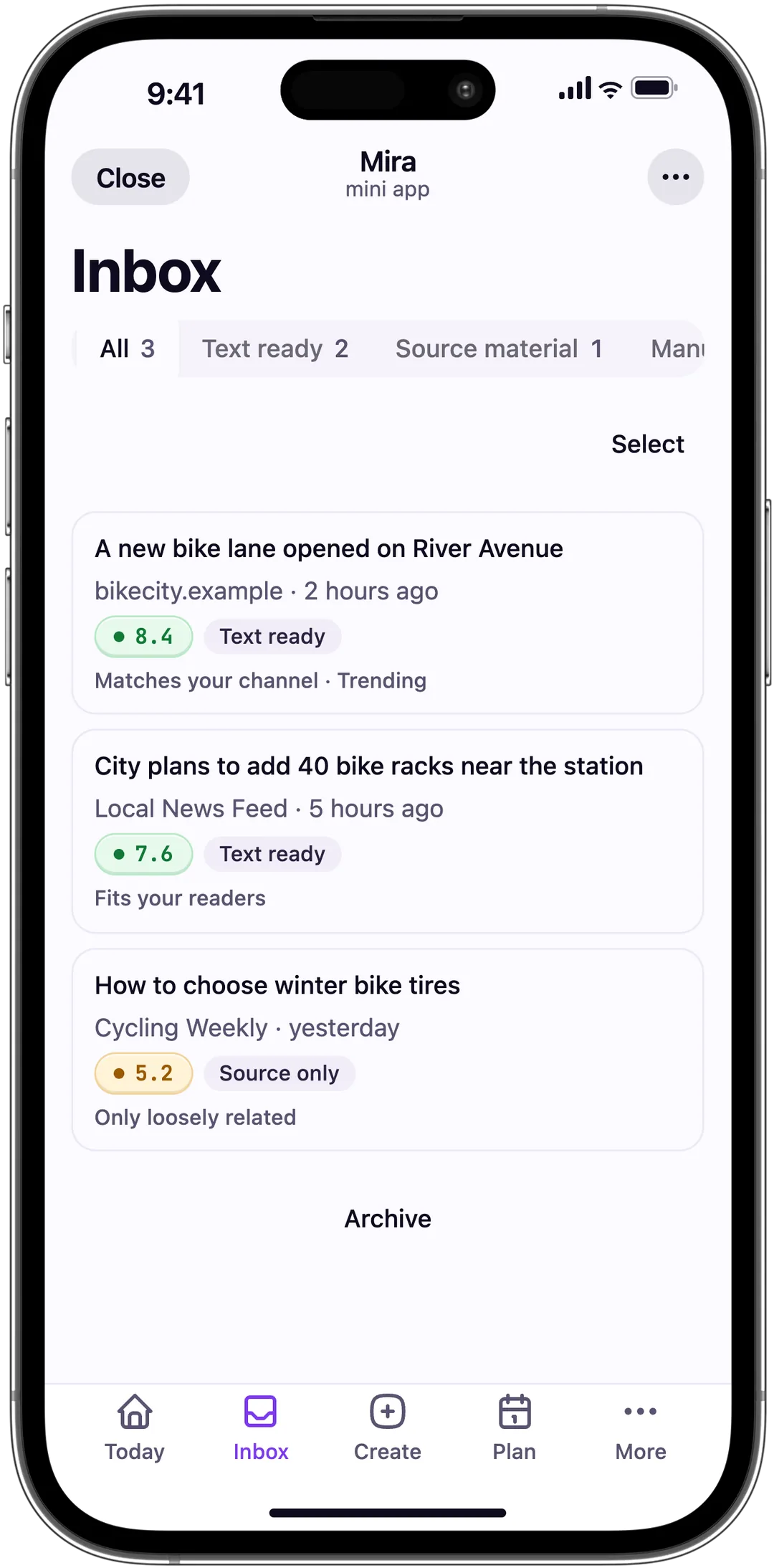
Here is how Mira does curation. You fill in a Profile: topic, audience, tone and what to avoid. Mira reads your Sources and scores each new item against that Profile. The best items wait in your Inbox with a short summary and the reason Mira picked them.
Balcony Garden
A seed bank opens free sharing for city gardeners
The city seed library now lends tomato and herb seeds for free. You return seeds from your own harvest in autumn.
Example draft, not a real post or a real channel. Each item in the Inbox comes with a score and reasons.
Reasons are short labels, such as "Matches your channel", "Full of facts" or "Fits your readers". If the picks feel wrong, fix the Profile.
Want to see what Mira picks for your topic? Add one source and read the Inbox.
How do you write drafts with AI and keep your voice?
AI keeps your voice only when you show it your voice. Give it examples, a length and strict rules about facts. Then edit the first line yourself.
The template below does four things. It shows three past posts as a style sample, sets the length, forbids new facts and asks for the source link. Copy it into ChatGPT, Claude or another chat assistant.
You write posts for my Telegram channel.
Channel topic: [topic]. Readers: [who they are].

Here are three of my past posts. Copy their length, tone and structure.
Do not copy their facts.
[post A]
[post B]
[post C]

Write one post from the source below. Rules:
- Use only facts from the source. Do not add numbers, names or dates.
- If something in the source is unclear, write [CHECK] instead of guessing.
- First line: one short sentence that says what happened.
- Up to [N] characters. Plain text. No headings, no tables.
- End with the source link: [URL]

Source:
[paste the article text]
We ran this prompt in Claude Opus 5.5 on 2026-10-11 with the Bot API 10.3 changelog. The draft and our edits are below.
Setup: a test channel about Telegram bots, not a real channel, three sample posts we wrote for it and a limit of 600 characters. The draft, word for word:
Bot API 10.3 is out: rich messages get buttons, tables get a compact mode.

Telegram released Bot API 10.3 on August 24, 2026. The main changes:
- Rich messages can now include buttons and file blocks, plus expandable block quotes.
- Tables in rich messages get an is_compact field.
- Ephemeral messages use a new ephemeral_message_parameters parameter in sendMessage and other send methods. [CHECK] whether old receiver_user_id code breaks.
- InlineKeyboardButton gets a disabled field, and DisabledButton is a new class.
- Bots can let users stop message generation with can_stop.

Source: https://core.telegram.org/bots/api-changelog
Then we checked each line against the source and made four edits:
- [CHECK] mark. The changelog says the new parameter "replaced" the old ones. We wrote exactly that and dropped the guess.
- can_stop line. The draft claimed more than the source says, so we removed it.
- Length. Five points became three.
- First line. Shorter, with the main change first.
The post after our edits:
Bot API 10.3: buttons inside rich messages.

Telegram released Bot API 10.3 on August 24, 2026. Three changes worth a look:
- Rich messages can now hold buttons, files and expandable quotes.
- Inline buttons can be disabled with the new disabled field.
- Ephemeral messages now take ephemeral_message_parameters. It replaces receiver_user_id and callback_query_id in sendMessage and other send methods.

Source: https://core.telegram.org/bots/api-changelog
The model marked its one unclear place, but one line still went beyond the source. Every draft needs a check, even a good one.
In Mira, you edit an Inbox item yourself or tap Improve with AI. In Create, you can also choose Create from a topic. Text that Mira wrote or changed is marked as a Mira draft.
How do you check facts before you publish?
Check every fact a reader could check: numbers, dates, names, quotes and links. Open the source and find each one there. If you cannot find it, remove it.
Google's guidance on AI-generated content asks publishers to fact-check and review all AI-generated text before publishing. It also explains why: models "predict a likely sequence of words" and do not look facts up, so their errors can read smoothly.
| What to check | How to check it | Warning sign |
|---|---|---|
| Numbers and prices | Find the same number in the source | A round number with no source line |
| Dates and "today" | Compare with the source date | "Yesterday" in a post about an old article |
| Names and job titles | Search the name in the source | A full name the source does not use |
| Quotes | Find the exact words in the source | Quote marks around a smooth summary |
| Links | Open every link | A link to a homepage instead of the article |
| Causes ("because", "after") | Check that the source says it | A reason the source does not give |
Before you press send, run this short check:
- I read the full post, not only the first line.
- Every number, date, name and quote is in the source.
- Every link opens the right page.
- The post says something my readers did not know.
- It sounds like my channel.
How do you edit and format a post for Telegram?
Keep the post short, put the main point in the first line, and check the preview before you send.
Telegram has firm length limits. A text message holds up to 4096 characters. A caption under a photo or video holds up to 1024 characters. Both limits come from the Bot API, version 10.3, checked on 2026-10-11.
Chat assistants answer in Markdown, and symbols such as ** or # can stay in the post when you paste it. Always check the preview.
Cut first, then rewrite the first line yourself: it shows in the chat list. Add formatting last.
The Mira editor in Create shows a preview, so you see the post before it goes out. For the full flow, read how Mira works.
See which Markdown markers Telegram turns into formatting and what survives when you paste AI text into Telegram.
To check the formatting before you publish, paste the draft into our free Telegram post editor.
How do you plan and publish posts?
Plan posts for times when your readers are awake, with gaps between them. You do not need AI here, because Telegram can schedule posts by itself. Before you fill a calendar, read how often to post.
In Mira, you plan a post from the Inbox and see it in Plan, by day. Free holds up to 5 planned posts at once. A planned post goes out on its own.
Pro adds auto-publish: you set the posts per day, a time window and the lowest score allowed. Mira publishes only drafts that pass.
Our advice: turn on auto-publish only when the scores match your own choices for a few weeks.
How do you read your channel's results with AI?
Telegram shows statistics to admins once a channel reaches a size that its statistics documentation calls a server-side setting. AI can sort followers, views, shares and reactions and point to patterns. It cannot tell you why readers acted.
Copy your recent numbers into this template. Then change one thing a week and compare.
Here are my last [N] posts with views, shares and reactions.
Sort them by shares.
Then list what the top 5 have in common: topic, length, first line, time.
Say only what the numbers show. Mark every guess as a guess.
What does a week with AI look like?
A working week has one setup step, a short daily review and a weekly look back. AI reads and drafts; you choose, check and send.
This is the routine we suggest. We did not measure how long each step takes.
| When | Step | AI's part | Your part |
|---|---|---|---|
| Once | Describe the channel | Uses it for every pick and draft | Write the topic, readers and what to avoid |
| Once a month | Review sources | Reads them on a schedule | Remove noisy sources |
| Every day | Review new material | Collects, scores and summarizes items | Pick a few items |
| Every day | Draft and edit | Writes and shortens a draft | Check facts, rewrite the first line |
| Twice a week | Plan | Auto-publish inside your rules, if on | Set times and gaps |
| Once a week | Look back | Sorts posts by shares | Pick one change |
A content plan for your channel keeps the whole week in one table.
Which approach should you pick: a chat assistant, an autoposter or Mira?
Pick by where your posts come from: your own ideas, or many outside sources.
| Approach | What AI does | Main risk | Pick it when |
|---|---|---|---|
| Chat assistant (ChatGPT, Claude, Gemini) | Writes from what you paste | Invents facts without a source | You write a few posts a week from your own ideas |
| Autoposter or forwarding bot | Little; it copies by your rules | Posts noise too | You need every item unchanged |
| Automation platform (Make, n8n) | Whatever step you build | Breaks when a service changes | You can build and maintain workflows |
| Mira | Reads your sources, scores items, drafts the best | A score can miss what readers want | You post most days from outside sources |
For the details, compare Mira and Make or Mira and Junction Bot, a bot that copies Telegram posts. The wider list is in our guide to compare AI bots for Telegram.
Our advice: start with a chat assistant. Move to a curation tool such as Mira when finding material takes longer than writing.
Skip Mira if you post once a week by hand, need every message copied unchanged, or your channel's rules forbid AI text.
An AI agent for a group or many tasks? See Mira vs TeleClaw.
Frequently asked questions
Can AI run a Telegram channel on its own?
Technically, yes: a bot can find, write and publish posts with no human. We advise against it, because AI errors are easy to miss. Approve every post, or set a minimum score if a tool publishes for you.
Which AI is best for writing Telegram posts?
There is no single best model. Test two or three assistants with the same prompt and source, and pick the draft that needs the fewest fixes.
Is AI-written content allowed in Telegram channels?
Telegram's Terms of Service do not mention AI-written posts, as of 2026-10-11. They ban spam, scams and some kinds of illegal content. Laws differ by country, so check your own; this is not legal advice.
How do I keep my channel's voice when AI writes drafts?
Show the model three of your past posts and forbid new facts. Then rewrite the first line yourself. In Mira, describe your channel in the Profile, and Mira uses it for every draft.
Is there a free AI tool for a Telegram channel?
Yes. Mira Free has no end date and gives 10 AI scoring runs and 3 topic drafts a day. It follows up to 5 websites and 1 Telegram channel; Pro costs 500 Telegram Stars, 690 RUB or 7 USDT per month.
Does AI make mistakes in news posts?
Yes: wrong dates, changed numbers, mixed-up names, made-up quotes and causes the source never gave. Google notes that models predict likely words rather than look up facts. That is why mistakes can read smoothly.
Start with one source
Pick one website your readers trust. Add it to Mira, fill in your Profile and read the first drafts in your Inbox. Check one and plan it for tomorrow.